

Most long-time JDE support folks have done all menu and task work on the dev client (aka "fat client"). It has come to Ask Denovo's attention that most of these same folks don't realize they can do all menu work directly on the web! This four-part series kicking off today will cover step by step instructions and tips on how to build and maintain your tasks and menus directly on the web. This week is covering foundational settings and best practices.
A client recently wanted to make a menu change. She asked if there was an easier way than going to a developer machine (aka dev client, aka fat client) since getting there is time-consuming. The answer is YES and is the reason for this new series on web-based options for building and maintaining your menus and tasks! This week we cover best practices, setting processing options on our Task application, and establishing the example we’ll be using for this series.
Firstly, best practice dictates that all menu work be done in DV then promote the menu objects up. This is important because Next Numbering can get out of sync between environments if you are doing menu work differently by environment.
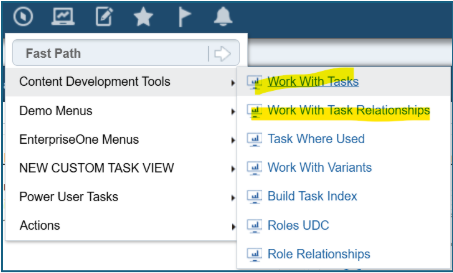
These are the menu options you can use to build tasks and associate those tasks to an existing menu tree:
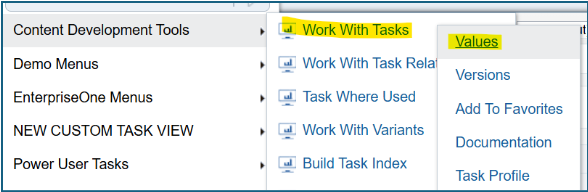
The Tasks application has processing options which dictate the Prefix of the task numbering. R=When you click Add in this application, P9000, the letters you see may be “JDE”. If you wish to have your company’s three letter acronym or another prefix of your choice, you can change the processing options by right-clicking on Work with Tasks, then clicking on Values:
Change the JDE to your company’s choice and click OK:
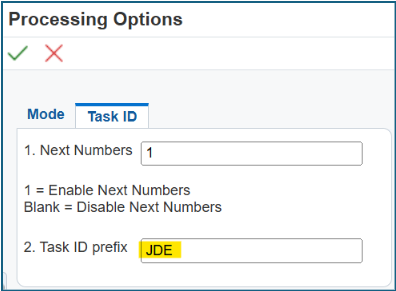
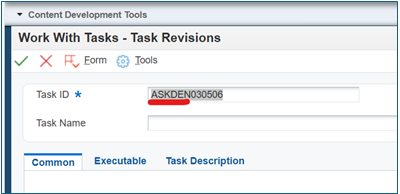
I’ve changed it to “ASKDEN”. Now when I click ADD in the Work with Tasks, I see the next number suffix and ASKDEN prefix:
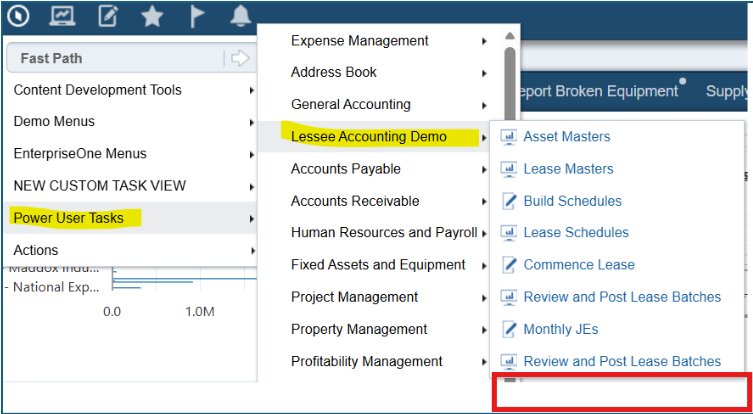
Lastly, for this series, we will be using the example of adding a Lessee Accounting Report, R5515001, to the bottom of this Lessee Accounting Demo menu here:
Next up in the series we'll build new tasks on the web!
If you want to get upgraded to the latest and greatest Release 26, let us know!