

This week we begin diving into the JDE Allocations, specifically the ones defined under the Allocations menu in the EnterpriseOne Menu Navigator tree. This week is all about Recurring Journal Entries.
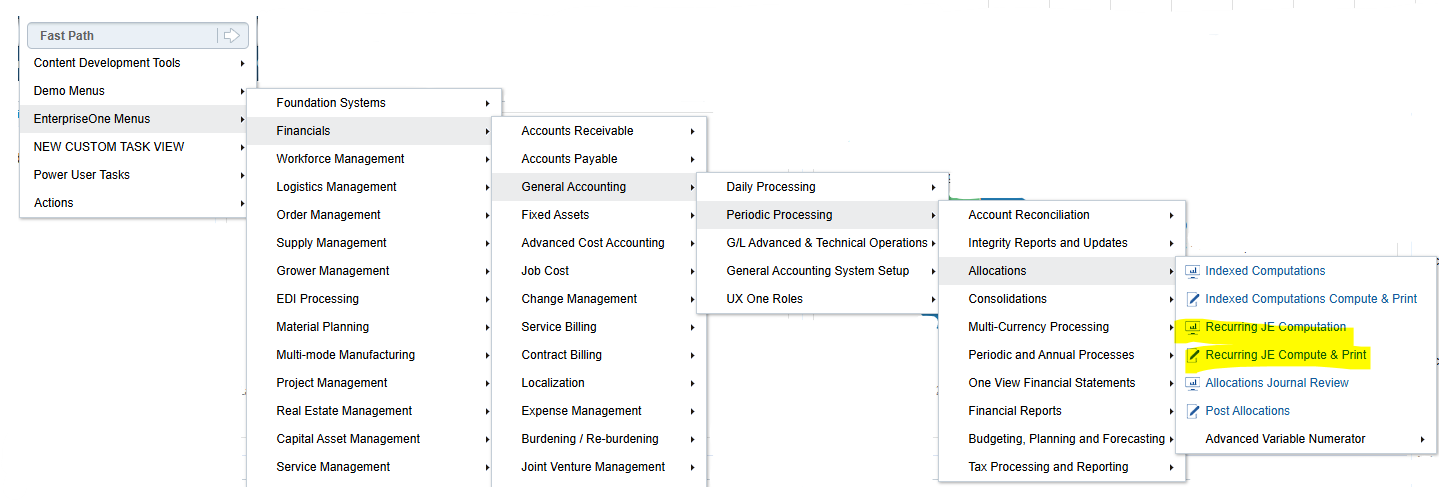
Recurring JE's are the simplest of the three Allocations listed in this menu and are comprised of the two objects P0912 where the Recurring JE is established and R09302 which is used to build the Recurring JE based on the frequency (e.g., monthly, quarterly, etc.).
This is a basic Amount-Based Recurring JE. Notice it looks just like a Journal Entry, but it has four fields specific to allocations highlighted here:
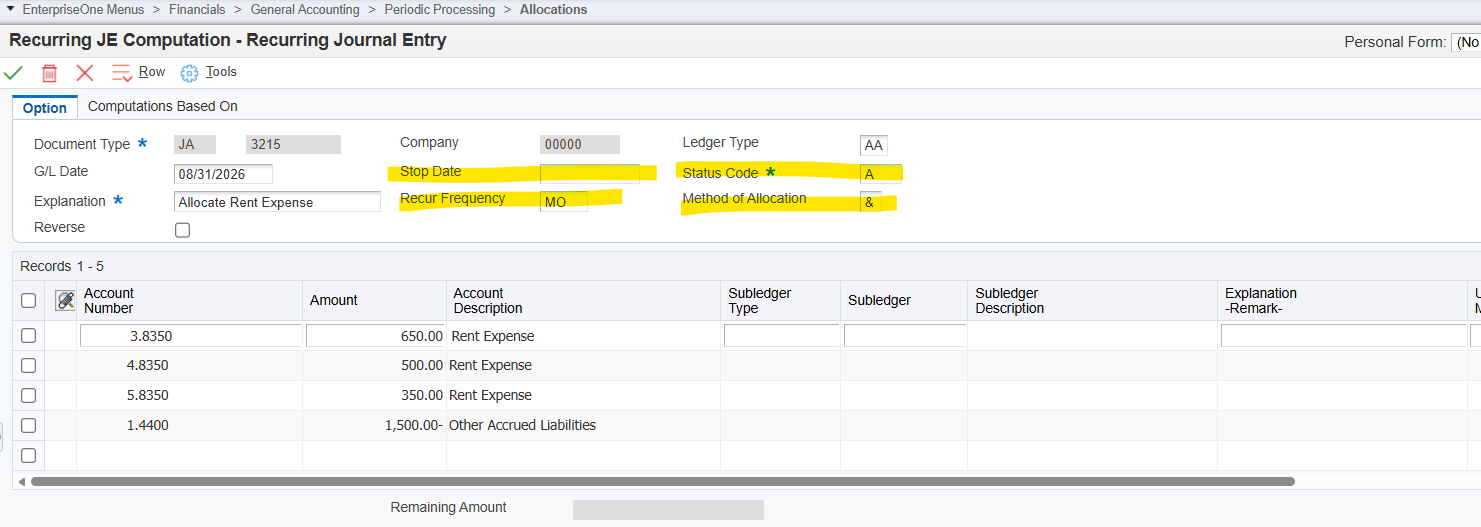
- The Stop Date is when an allocation will stop running regardless of the Status Code.
- Status Code is defaulted with "A" active, but this can be changed to "H" to "Hold" if the allocation needs to be temporarily put on hold.
- The Recurring Frequency is a hard-coded list of values - Weekly, Monthly, Quarterly, Semi-Annually, and Annually. These are based on your Date Pattern for the Company in the Header.
- Method of Allocation has three options:
- & - This is just amounts as shown in the grid.
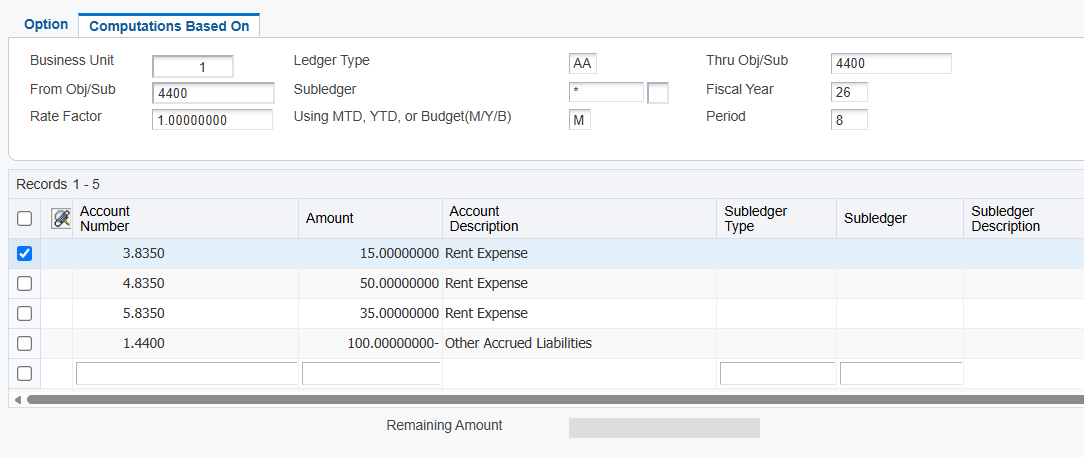
- % - Percentage Amount opens the tab at the top, Computations Based On. Think of these fields as Data Selection of the dollar amounts you want to "grab" from your F0902 balances table. The system uses the percentage that you specify in the Amount field to perform the allocation of those Data-Selected amounts. This is an example of that same Amount Recurring JE but framed up to grab everything in the crediting account to distribute it to the other three departments:
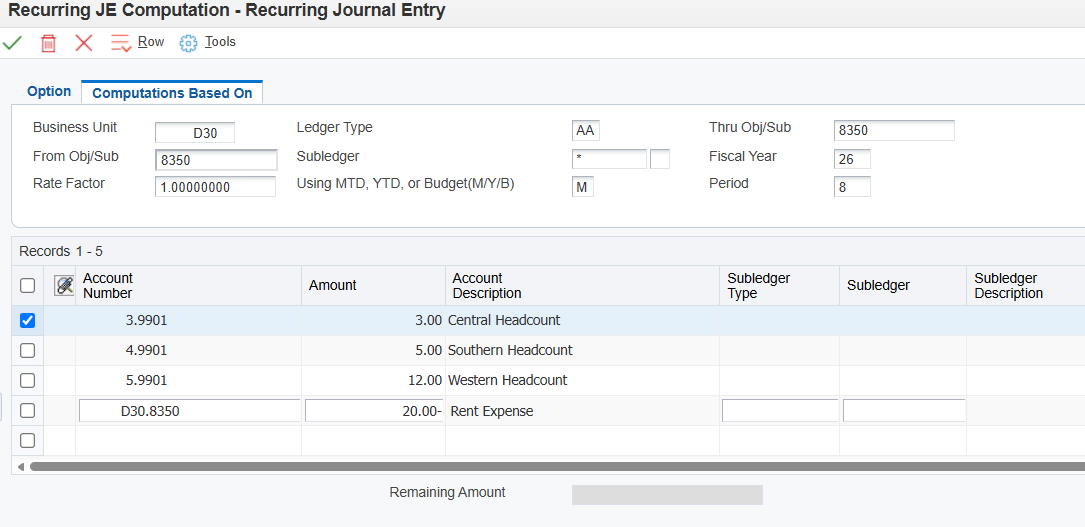
- U - Unit Amount also opens up the tab at the top, Computations Based On. The same applies where you define what dollar amounts you want to "grab" from your F0902 balances table. The system creates a percentage from the units that you specify in the Amount field to perform the allocation of those Data-Selected amounts. This is an example of Rent Expense in a warehouse to be distributed based on headcount in the departments. Amount Recurring JE but framed up to grab everything in the crediting account to distribute it to the other three departments:
Once created, the R09302 is then run. Proof can be run before Final to ensure accuracy before generating the month's / quarter's / year's Recurring JE. When run in Final mode, the GL Date on the Recurring JE will be incremented forward based on your frequency and your Date Pattern.
The final step is to post the "D" batch in Batch Review.
Things to keep in mind:
1. To avoid bad FY errors, make sure to fill in the Header fully before moving to the grid. (There is a known issue when GL Date is not populated in the Header then populated in the grid.)
2. You should create different versions of the Recurring JE Compute & Print program for recurring frequencies, specific companies, and specific document types.
3. You can void a Recurring JE in the regular way if it is not set as a reversing JE. If you need to void a reversing Recurring JE, please refer to this additional Oracle Knowledge document on how to correctly void a reversing JE here.
For even more details on Recurring JE's, check out Oracle's Knowledge Doc KB528341, E1: 09: Overview of Recurring Journal Entries (P0912/R09302).
Do you have a clever function you've adopted during month-end to help speed up your month-end? Let us know!