

We've saved the simplest for last - Models for Allocation purposes.
To setup a new Model, click Add in Journal Entry application, and start by clicking on the Model radio button:
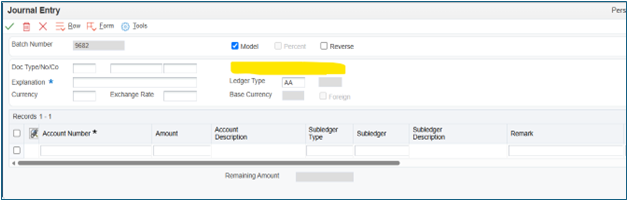
Notice the GL Date field disappears. This will show up when you're ready to use the Model. Fill out the remaining elements of the journal entry, then save. Back on the general inquiry here, you can click the Model radio button to see all the Models:
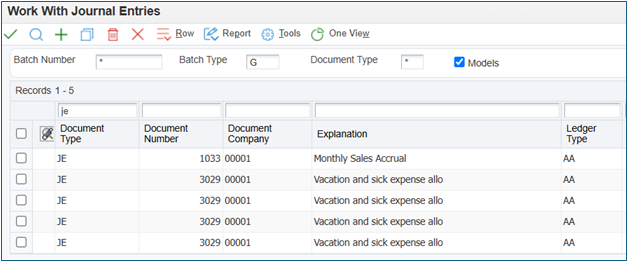
To use a Model, highlight the row, and click Copy. This will open the Model as a regular journal entry. Then you can enter the GL Date and make any changes if needed:
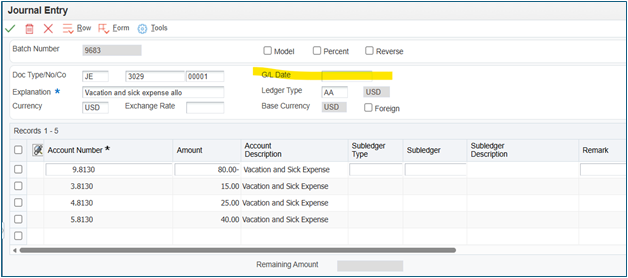
This is a link to an Oracle knowledge document about all things Model Journal Entries.
This concludes our series on Allocations. Thanks for joining us!
To setup a new Model, click Add in Journal Entry application, and start by clicking on the Model radio button:
Notice the GL Date field disappears. This will show up when you're ready to use the Model. Fill out the remaining elements of the journal entry, then save. Back on the general inquiry here, you can click the Model radio button to see all the Models:
To use a Model, highlight the row, and click Copy. This will open the Model as a regular journal entry. Then you can enter the GL Date and make any changes if needed:
This is a link to an Oracle knowledge document about all things Model Journal Entries.
This concludes our series on Allocations. Thanks for joining us!
If you want to tackle this with a Denovo expert, let us know!